Skip to content
Soliqo

Notes from any meeting, video, or PDF.Without writing them.

Soliqo turns audio, YouTube links, and PDFs into clean summaries with action items — in 70+ languages. For people who'd rather talk than type.

iOS & Android
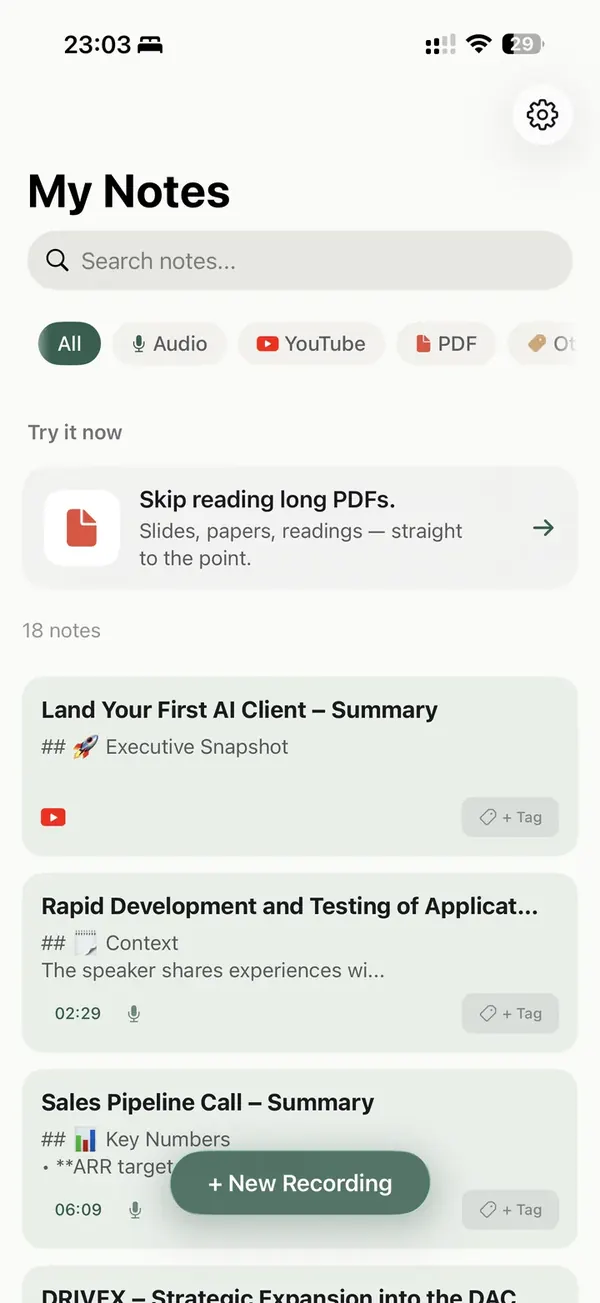
Built for people who'd rather talk than type

Meetings, calls, lectures, videos, documents — Soliqo summarizes them all.

Founders & operators

Investor calls, customer interviews, team standups. Every conversation becomes a searchable note with clear next steps. No more "what did we decide again?"

Consultants & coaches

Your client talks, you listen. Soliqo takes notes. After the session you get a structured summary you can send straight to the client.

Freelancers & solo pros

Record the kickoff call, get a written brief in minutes. Send it to the client the same day. Look professional, save two hours.

Three taps. That's it.

Step 01

Record, paste, or upload

Open Soliqo and record a meeting or call, paste a YouTube link, or upload a PDF — whatever you need summarized.

My Notes
Search notes…
All Audio YouTube
New recording
Record audio
Capture a meeting or call
Import audio
MP3, M4A, WAV
Paste YouTube link
Get key points
Upload PDF
Slides, papers
New Recording
Fig. 01New recording sheet
Step 02

AI listens and summarizes

Soliqo captures everything — with speaker separation — and turns it into key points and action items.

18:225G
00:02
STOP
PAUSE
DONE
Fig. 02Recording in progress
Step 03

Get your notes in minutes

You get a summary, action items with names, and the full transcript. Export to PDF, text, or notes — or share a link.

Discussion of SDVG…
28 APR · 12:40⏱ 4 MIN
SummaryTranscript
📝 Key Decisions
  • – Strategic shift entirely toward SDVG
  • – Reduce slides in app to three
  • – Adjust UI/UX: line spacing, density
  • – Founders to approve mid-week
Tasks
  • – Refine design (line spacing, density)
  • – Prepare three slides for the app
  • – Send recap to ops + design
💬 Context & Mood
  • – Team aligned on tighter scope
  • – Low friction on UI cleanup
Fig. 03Note detail

See it in action

30 seconds. Real meeting. Real output.
Play demo video

Why Soliqo, not pen and paper?

We love notebooks too. Here's where they fall short.

After-meeting time spent
Soliqo0 min — already done
Pen & paper30+ min retyping
Attention during the meeting
SoliqoFully on the conversation
Pen & paperSplit between writing and listening
Find a note 3 weeks later
SoliqoFull-text search, tags
Pen & paperFlip through pages
Action items extracted
SoliqoAutomatically
Pen & paperHighlight and copy by hand
Who said what
SoliqoSpeaker separation built-in
Pen & paperNot really possible
Send to a client
SoliqoLink, PDF, or audio
Pen & paperRe-type or photograph it

*Notebooks are great — for sketches, recipes, marginalia. Just not for capturing six client calls a day.


"We're shipping every week, in the open."

We're building Soliqo in the open.

Hi, we're Nikita and George. We're two founders in Prague, and we got tired of writing meeting notes after every call. So we built Soliqo for ourselves first — and now we're sharing every step of the journey on TikTok and LinkedIn.

No marketing team. No VC playbook. Just the two of us, shipping in public.

Latest posts

0+
Active users
0+
Meetings transcribed
0
Days building
5.0·5 Ratings
App Store

Best for voice notes

"Recording everything now, real productivity boost"
makesappy · 26 Apr

Questions, answered

Yes. Soliqo understands Czech and Slovak natively, with accuracy on par with English. We also support 20+ other languages.
All recordings and transcripts are stored on EU servers, encrypted at rest and in transit. Your data is never used to train AI models — yours or anyone else's.
Yes — and it works for in-person meetings too. Just put your phone on the table.
Yes. Export your notes as audio, PDF, or plain text.
Soliqo identifies different speakers automatically and labels them in the transcript.
Czech, Slovak, English, German, Spanish, French, Italian, Polish, Portuguese, Dutch, Russian, Ukrainian, and more — over 25 languages in total. We use the same speech models as the major US apps but tune them for European accents. You can switch the default in Settings, and Soliqo will auto-detect the language of each recording.
For clear audio in supported languages, accuracy is on par with the best transcription apps on the market — typically above 95% for a single speaker, and 90%+ in noisy environments or with multiple speakers. The model keeps improving. If a name or specific term comes out wrong, correct it once and Soliqo will remember it for future recordings.
Recording works offline — your audio is captured locally even without signal. Transcription needs a connection because audio is processed on EU servers. Once a note is generated, it's available offline like any other note in the app, and the next recording you make offline will be processed automatically when you reconnect.
Yes. You can lock your phone, switch to another app, or put it in your pocket — recording keeps going. On iOS we use the standard background-audio mode, so you'll see a small recording indicator at the top of the screen while it's running. Battery use is minimal.
iPhone, iPad, Android phones and tablets, Mac, and Apple Watch (as a companion to start/stop recording from your wrist). The same account syncs across all of them — start a recording on your phone and see the note appear on your Mac.
Tell us directly. We read every email and ship fixes the same week. → support@soliqo.online

Talk. Soliqo writes the notes.

Meetings, videos, PDFs — summarized in seconds. Try for free.

No account needed to try. Cancel anytime.